Empower people, Enable participation
Mainio Tech provides modern, effective solutions for participation and collective decision-making. We are a team of participation experts at your service!

To sign in to the dashboard, you have to authenticate yourself to the system. This is done by signing in the same way as participants. Signing in to the system is described in the section "Signing in and authenticating".
After signing in you will find a link to the dashboard from your account-specific actions, which is found from the top right corner (presented in the image below). If your account has admin-rights, you will find a link to the dashboard from your account's actions named "Dashboard". By pressing the link you will navigate to the dashboard.
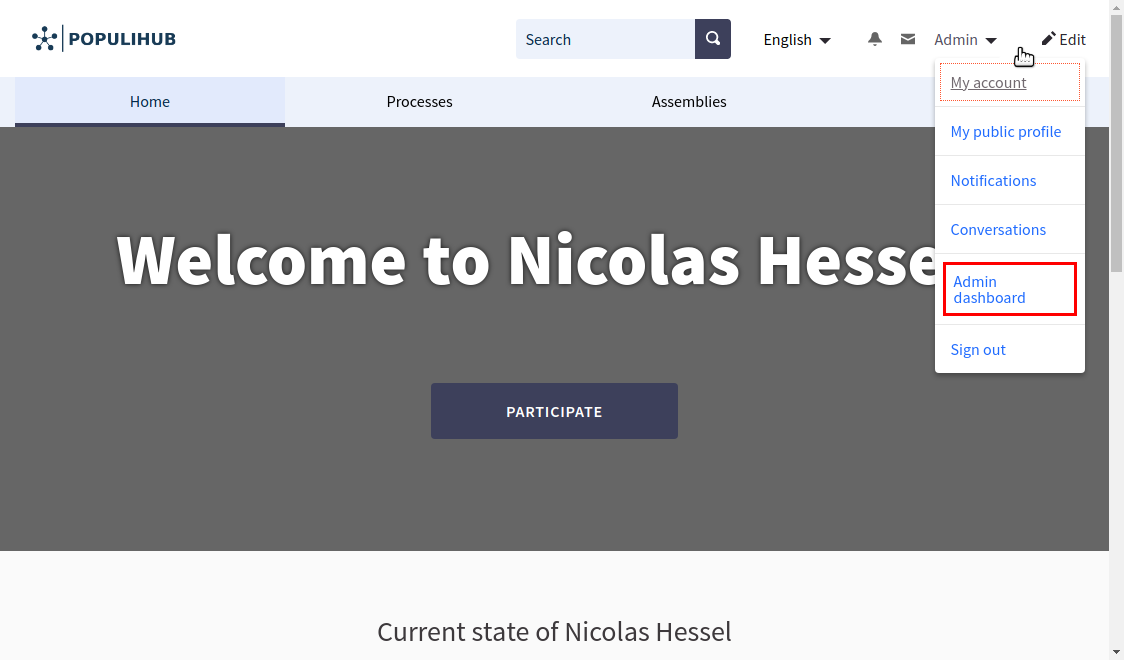
If the "Dashboard" -link does not show up for your account, sign out and sign in again with another account that has admin rights. Make sure that you have signed in with an email that has been given admin-rights, and not for example your private email or Facebook -account. If you are sure you have signed in with the right email address, contact your organization's contact person to solve the issue.
All-in-one digital platform for all your participation needs. Easy-to-use and reliable, so you can spend more time engaging with people.
Mainio Tech provides modern, effective solutions for participation and collective decision-making. We are a team of participation experts at your service!