Empower people, Enable participation
Mainio Tech provides modern, effective solutions for participation and collective decision-making. We are a team of participation experts at your service!

All relevant information and features related to a process can be found on the process pages. The components of a process can change according to the process administrator's preferences. Components can be found within the process section as its subpages or tabs, under the title and banner image, as presented on the image below. The first subpage or tab (Process) is available for every process by default and that page contains the general information about the process and any attached information, such as related documents and images.
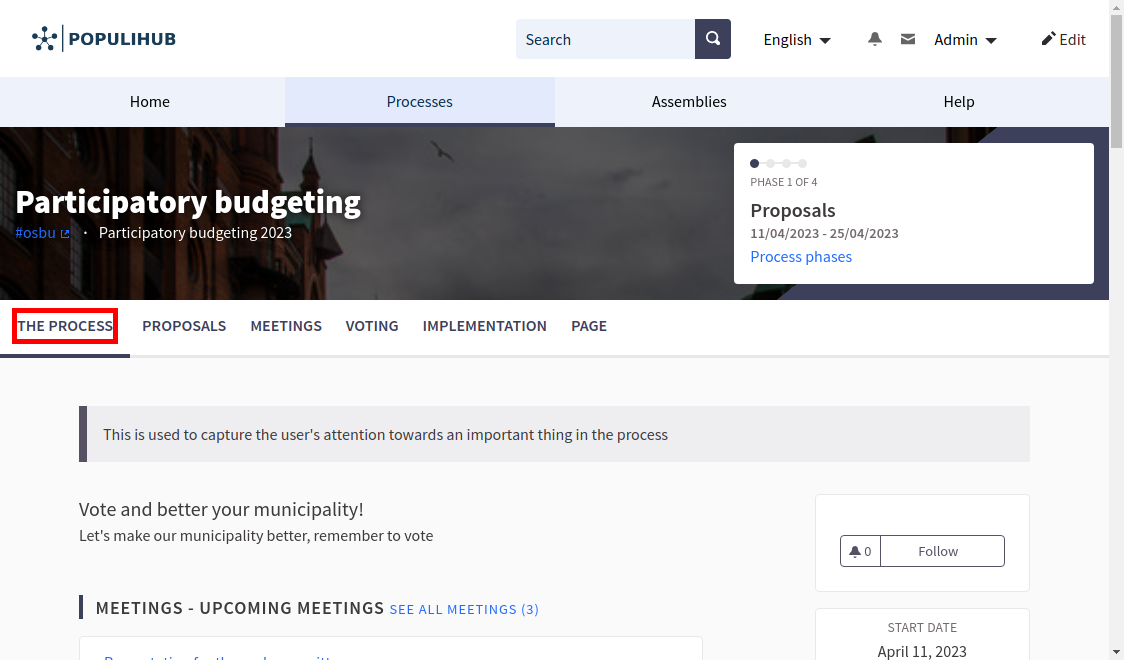
The general information about the process is shown on the top of the process page, above the banner image. This information is shown on every process subpage, to help the participants to understand the context of the section that they are browsing. Information about the phases and progression of the process is presented on the right side of the process information. Participants can find more information about the process phases by following the "Process phases" link found in this section. Process phases are described more in depth in the Process phases section.
When the process is ongoing, administrators can also include a "call to action" button within the general information area describing the process phases. This button can be used to guide the participants to the relevant section related to each phase. For example, when collecting proposals, the administrators might want to guide the participants to the proposals page or to the proposal submission form. The call to action button can be configured separately for each phase from the process phases section of the administration dashboard.
All-in-one digital platform for all your participation needs. Easy-to-use and reliable, so you can spend more time engaging with people.

Mainio Tech provides modern, effective solutions for participation and collective decision-making. We are a team of participation experts at your service!